🗺️ District Renamer Guide
Customize your district names in The Sims 4 using the bonus package included with the
World Rename Mod – Ultimate Edition by midnitetech
🌍 What is a district? A district is a neighborhood within a world, e.g. Foundry Cove in Willow Creek
1. Download Sims 4 Studio
Don’t have it yet? Grab it here: sims4studio.com
Don’t have it yet? Grab it here: sims4studio.com
2. Open the mod in Sims 4 Studio
• Launch Sims 4 Studio → File → My Projects
• Navigate to midnitetech_RenameDistricts.package in your Mods folder and Click Open
• Launch Sims 4 Studio → File → My Projects
• Navigate to midnitetech_RenameDistricts.package in your Mods folder and Click Open
3. Edit district names
• Click on your preferred language
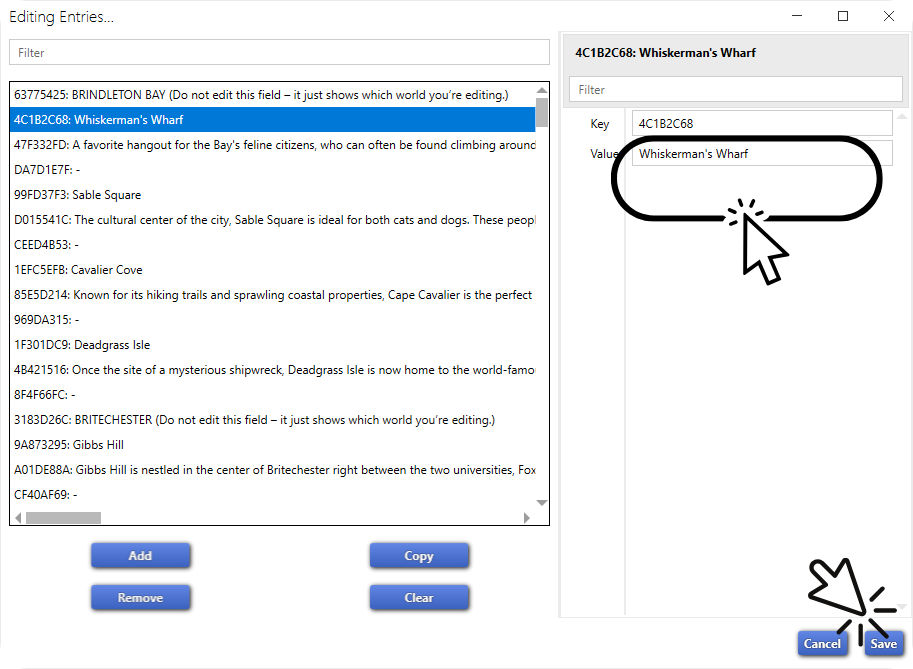
• Click Edit Entries in the right hand pane
• Type your custom names + descriptions into Value (leave those you don't wish to change as they are)
• Click Save, and then Save again before you close the .package
• Worlds are sorted alphabetically with placeholders so you know which is which
• Click on your preferred language
• Click Edit Entries in the right hand pane
• Type your custom names + descriptions into Value (leave those you don't wish to change as they are)
• Click Save, and then Save again before you close the .package
• Worlds are sorted alphabetically with placeholders so you know which is which
4. Want different names for different saves?
Rename the file itself! Example:
midnitetech_RenameDistricts_LegacySave.package
Keep only one version is in your Mods folder before loading your game.
You can rename all the worlds per-save, using my main World Rename Mod.
Rename the file itself! Example:
midnitetech_RenameDistricts_LegacySave.package
Keep only one version is in your Mods folder before loading your game.
You can rename all the worlds per-save, using my main World Rename Mod.
5. Reset to default?
Simply delete the package file. Easy!
Simply delete the package file. Easy!
⚠️ Note: District names are global overrides — you can’t change them per save. Only one version should be active at a time, and will affect ALL saves, but only whilst the .package is in your Mods folder!


